Bringing AI into everyday workflows
Brands and distributors use Salsify as a source of truth for the ecommerce product data and assets they need to sell across online retailers. As generative AI became more prevalent, we saw an opportunity to automate time-consuming manual work and help customers work more efficiently.
The business wanted to bring AI capabilities to market quickly and establish Salsify as a leader in the space. Engineering had already demonstrated what was possible through an internal proof of concept (POC), and our team was tasked with turning it into a production-ready MVP. I led the UX strategy, discovery, and design required to create a customer-ready experience.
The result was Intelligence Suite, which embedded AI capabilities into Workflow, Salsify’s tool for automating product data processes through repeatable steps, rules, and human review. Customers could generate, extract, and optimize content at scale while reviewing results before committing changes to their data.
Making AI work within real-world constraints
The POC proved the technology worked, but the experience reflected its technical architecture rather than customers’ mental models. Configuration was considerably longer than existing Workflows, with dense settings, technical terminology, and controls whose effects weren’t always obvious. Output quality also depended heavily on the prompts customers wrote—another hurdle for users who weren’t AI or Workflow experts.
We couldn’t redesign Workflow from scratch. Intelligence Suite had to fit its existing patterns and technical constraints without disrupting established customer processes.
The stakes were high: inaccurate AI outputs could affect product data at scale, introducing customer trust, financial, and regulatory risks.
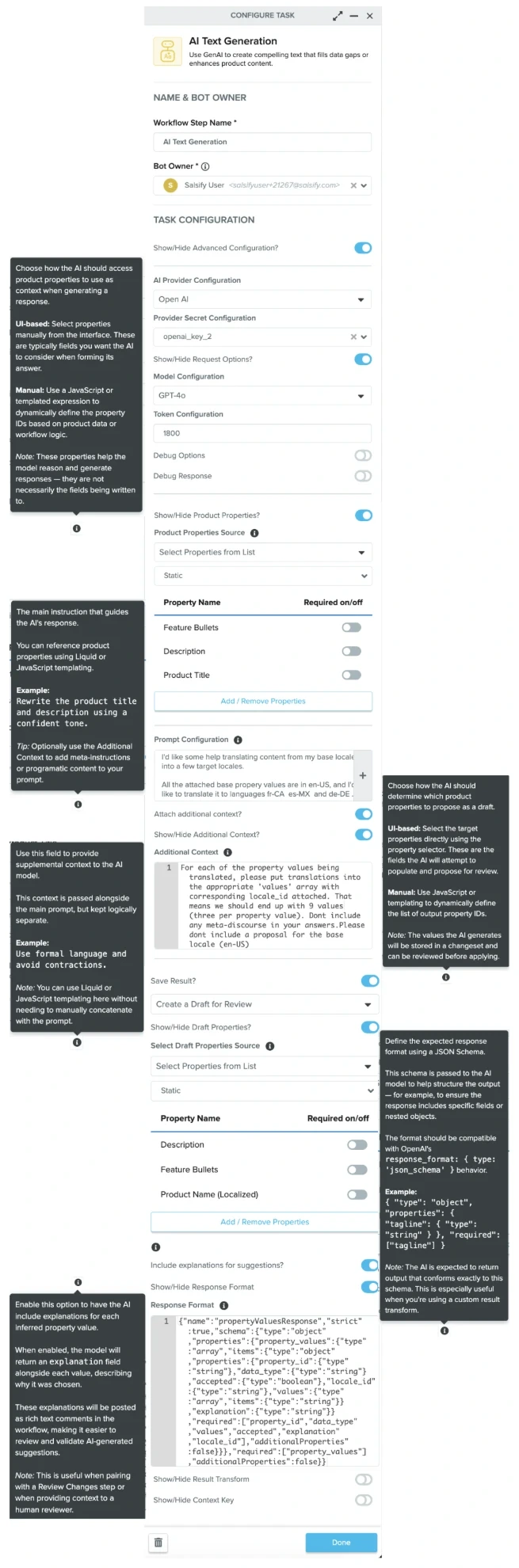
The proof of concept’s AI Text Generation configuration: long, dense, and reliant on large help tooltips.
Long setup
Configuration was considerably longer than existing Workflows.
Hidden behavior
“Show/Hide” toggles for advanced configuration, with effects that appeared below the fold.
Technical terminology
Settings like Provider Secret Configuration, Token Configuration, and a raw JSON response format.
Oversized hover tooltips
Help needed to complete setup was tucked into large hover tooltips.
Understanding the complexity, and deciding what not to ship for the MVP
Before deciding what belonged in the MVP, I needed to understand the system myself. Configuration changed by AI task (such as text generation or image analysis), the product data or assets involved, and dependencies among settings. Even after exploring the POC, some relationships remained unclear.
I mapped these scenarios to identify what users needed to configure and where we could simplify the experience.

Deciding what not to ship
With roughly five months to launch, we couldn’t assume every POC capability belonged in the MVP. I led a detailed review with product and engineering, evaluating configuration options one by one and drawing on feedback from customer-facing teams.
The instinct was to offer maximum flexibility, but several advanced controls were difficult to explain, even internally, and it wasn’t clear when customers would benefit from changing the defaults. We chose a simpler starting experience, deferring options whose complexity outweighed their immediate value. This was applicable for sections like debugging responses, response formats and context keys, and defining custom review behavior other than reviewing for suggestions or directly editing.
| Included in POC? | Included for Oct release? | |
|---|---|---|
| Show/hide Advanced Configuration toggle | Yes | No |
| AI provider details | Yes | Yes |
| Debug options, debug response | Yes | No |
| Show/hide Product Properties toggle | Yes | No |
| Prompt configuration text box | Yes | Yes |
| Additional Context text box | Yes | Yes – text support only (no code block) |
| Additional Context toggles | Yes | No |
| Properties source | Yes | Yes – Select properties from listNo – Manually define properties |
| Property types | Yes | Yes |
| Property selection | Yes | Yes |
| Save result toggle | Yes | No |
| Save results as | Yes | Yes – create draft for reviewYes – directly edit productNo – custom |
| Include explanations for suggestions toggle | Yes | Yes |
| Response format, response transform, and context key | Yes | Yes |
Redesigning around how customers actually work
Once we’d clarified the MVP scope, I reorganized configuration within Workflow’s existing UI patterns to follow the order in which customers would complete their tasks.
The result was a more focused configuration experience that preserved necessary flexibility without exposing every technical detail up front.

The proof of concept’s configuration (left) next to the shipped panel (right): shorter, and grouped into clear sections. Numbers match the principles beside.
Keep critical guidance in context
Put necessary help directly beside the relevant settings instead of hiding it in oversized hover tooltips.
Separate configuration from education
Move deeper technical explanations to supporting enablement resources so they didn’t interrupt setup.
Create meaningful hierarchy
Group related settings into clear sections and sequence them around the task rather than the underlying system.
Make important controls visible
Remove unnecessary “advanced configuration” toggles so users could see essential options and their effects without searching below the fold.
Building trust through transparency and control
Simpler configuration wasn’t enough. Because AI could change large volumes of product data, customers needed ways to understand recommendations and control when changes became final.
Explain recommendations
For review-based workflows, I defaulted to showing explanations alongside AI-generated results so customers had context for evaluating them.
Make review the default, not the only option
We used Workflow’s existing draft functionality to encourage human review before updating live data. Initially, we planned to remove direct editing altogether. But customer-facing teams surfaced use cases where it was necessary, such as generating alt text for images or adding metadata to images, so we restored it with a warning banner added and kept review-first behavior as the default.
Build on familiar safeguards
These choices reflected longstanding customer feedback across Salsify: users wanted the product to teach them how to complete unfamiliar tasks rather than assume expertise.
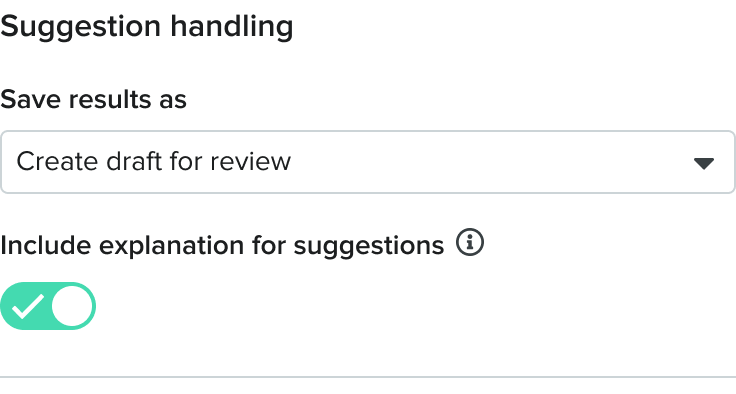
Feature added back in after stakeholder feedback

Helping customers get started without becoming AI experts
Even a clearer setup couldn’t solve a fundamental challenge: most customers weren’t experienced prompt writers. Starting from a blank field would slow adoption.
For the MVP, our team turned 13 high-value use cases (previously identified through earlier customer and stakeholder input that went into creating the POC) into pre-packaged AI Accelerators. We created, refined, and tested prompt templates so customers could begin with useful configurations rather than build workflows from scratch. We also designed prompt writing best practices, enablement on how to use each accelerator, and how to ensure users took advantage of the functionality.
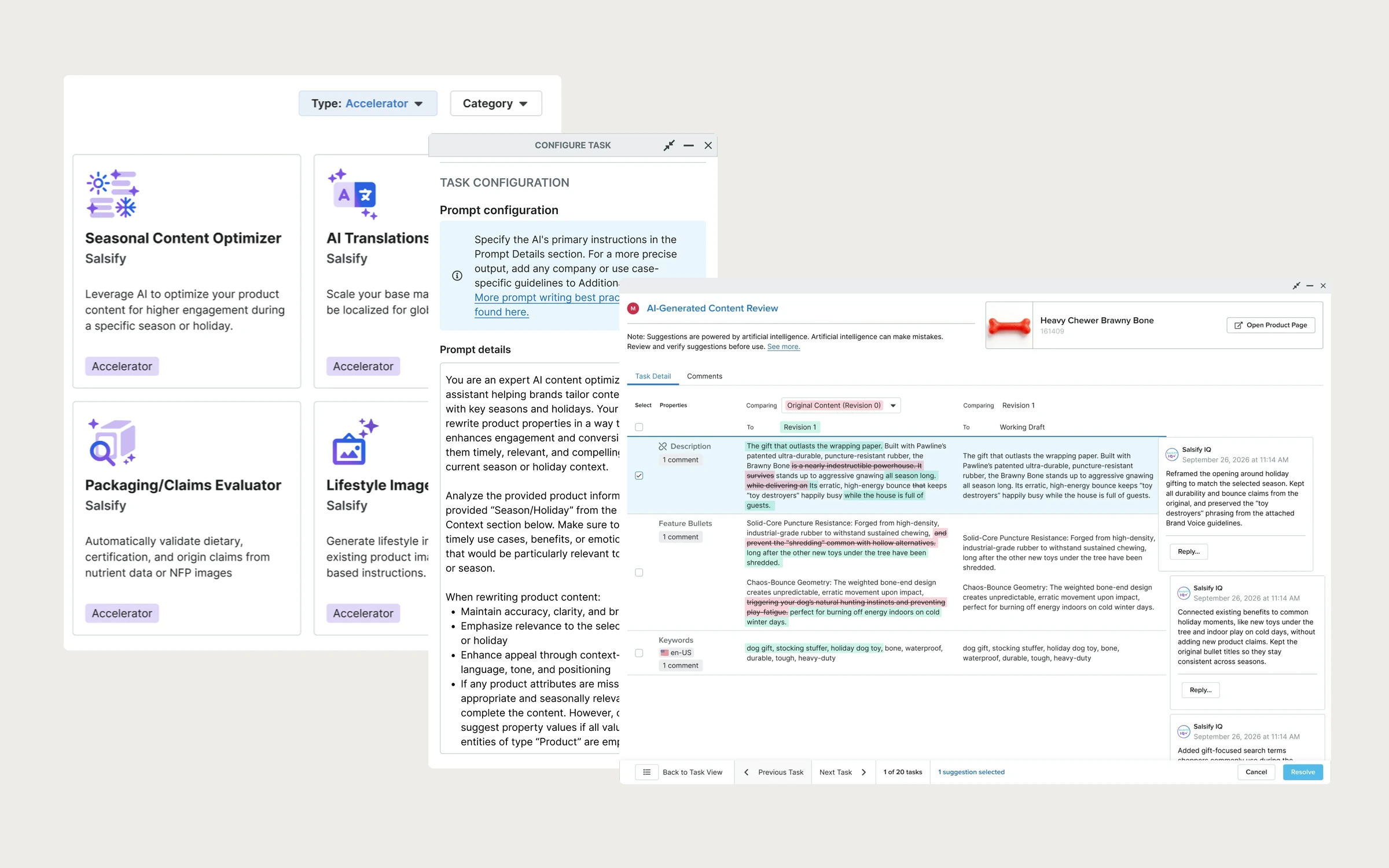
One example was content optimization. Customers with small content teams—or lengthy review processes—could use an Accelerator to adapt existing marketing copy for seasonal campaigns, shopping events, or different audiences instead of repeatedly rewriting it by hand.
The goal was to give customers a faster path to value while helping them learn how to build and adapt their own AI workflows over time.

The Seasonal Content Optimization Accelerator: example of a ready-made workflow and pre-written prompt, based on a high-value customer need. Customers only need to enter the season or holiday to get started.
Ready-made workflow
AI generation and review steps come already connected.
Pre-written, quality-tested prompt
The prompt for seasonal content optimization is written and tested in advance.
One thing to fill in
Customers just enter a season or holiday to get started.
Letting customer needs shape what came next
The MVP launch began an ongoing cycle of discovery and prioritization. Image generation was emerging as a likely next investment: customers and Sales teams were asking for it, and our team’s model testing was producing more promising results.
Ahead of our annual customer conference, I facilitated a user-story mapping workshop with product and engineering to surface dependencies, align on the end-to-end experience, and decide what we could prototype for the next milestone.
We shared future concepts with hundreds of customers at the conference, alongside continued customer interviews and feedback from customer-facing teams. That input helped us create 6 additional image-generation accelerators around tasks customers were otherwise handling manually or outsourcing to agencies: tasks like creating lifestyle images, image variants, hero images for multipacks and highlighting attributes, and infographics.
We also had to adapt the roadmap as AI capabilities and requirements evolved, including unplanned compliance work related to the EU AI Act to add visible watermarking and filters for AI-generated images.

From launch to real-world adoption
- Highest-selling module in Salsify’s history
- #1Highest-selling module in Salsify’s history
- Production-ready AI Accelerators across MVP and subsequent releases
- 19Production-ready AI Accelerators across MVP and subsequent releases
- Workflows aligned with existing Accelerators
- ~80%Workflows aligned with existing Accelerators
Intelligence Suite became Salsify’s highest-selling module to date. Customers also reported meaningful time savings from AI-powered workflows, giving them more time for higher-priority work.
Understanding real-world usage
Our usage dashboard suggested that most customers weren’t using Accelerators at all, which seemed unlikely. To find out what was really happening, I analyzed customer configuration and prompt data using Claude and internal data tables to see how customers were applying AI in practice.
Approximately 80% of workflows aligned with our 19 existing Accelerators. This supported our initial selection of use cases while revealing emerging patterns to monitor for potential future templates.
The analysis also pointed to a gap in how usage data was being captured, which I flagged to our data team for further investigation.
~70% of workflows weren’t using Accelerators.
~80% of workflows aligned with existing Accelerators.
A data-capture gap flagged to the data team for investigation.
What I’d explore next
Embedding AI into Workflow delivered value quickly, but configuration still required more time and product knowledge than I wanted. Based on my own experience and recurring snippets of customer and stakeholder feedback, I suspect the first successful setup remained a major hurdle.
I’d explore a more guided, hands-on experience that walks customers through creating their first high-value AI workflow, then helps them confidently customize and build their own.